
Global Site
Displaying present location in the site.
March 10th, 2026
Machine translation is used partially for this article. See the Japanese version for the original article.
Introduction
With the cooperation of Amazon Web Services Japan G.K., we verified building HA clusters between EC2 instances running on AWS Outposts racks, and confirmed that the HA cluster can be successfully built in this environment.
By deploying an HA cluster with EXPRESSCLUSTER on AWS Outposts racks, we can deliver a low-latency, highly available system.
In this article, we introduce, along with our verification results, the differences in available switching destination methods in EXPRESSCLUSTER and the considerations that arise from differences in AWS resources, when building an HA cluster in an AWS Region versus on AWS Outposts racks.
We verified the following three configurations.
4.1 Verification 1: Building an HA Cluster with Two EC2 Instances on a Single AWS Outposts rack
4.2 Verification 2: Building an HA Cluster with Two EC2 Instances on Two AWS Outposts racks
4.3 Verification 3: Building an HA Cluster with Two EC2 instances Between an AWS Outposts rack and an AWS Region
We used AWS Outposts Test Lab for this verifications.
[Reference]
AWS Outposts Test Lab https://github.com/aws-samples/otl-getting-started
In the previous article, we also verified building an HA cluster on AWS Outposts servers, which is part of the AWS Outposts family. For details, please refer to the article below.
Contents
- 1. What is AWS Outposts?
- 2. Network Components of AWS Outposts racks
- 3. Consideration When using EXPRESSCLUSTER X on AWS Outposts racks
- 3.1 Control Plane and Data Plane
- 3.2 Application Load Balancer
- 3.3 Amazon S3 on Outposts
- 3.4 Communication Between Multiple AWS Outposts racks
- 4. Verifications
- 4.1 Verification 1: Building an HA Cluster with Two EC2 Instances on a Single AWS Outposts rack
- 4.2 Verification 2: Building an HA Cluster with Two EC2 Instances on Two AWS Outposts racks
- 4.3 Verification 3: Building an HA Cluster with Two EC2 Instances Between an AWS Outposts rack and an AWS Region
1. What is AWS Outposts?
AWS Outposts is a fully managed service that, when installed at customer locations such as data centers, factories, and retail stores, makes it possible to run AWS services outside AWS data centers. Its actual form consists of a physical server or rack that can be utilized in environments meeting the installation requirements.
This enables you to use familiar AWS services, tools, and APIs to integrate with on-premises systems with low latency and to meet data residency (location) requirements.
AWS Outposts comes in two types—AWS Outposts servers and AWS Outposts racks—which differ in pricing, physical size, processor options, and the number of available AWS services. As of March 10th, 2026, the available processors and services are:
- ■AWS Outposts servers
-
Processor
- -Intel Xeon processor
- -AWS Graviton2 processor
- -
-
AWS services
- -Amazon Elastic Compute Cloud (EC2)
- -Amazon Elastic Container Service (ECS)
- -AWS IoT Greengrass
- -Amazon Virtual Private Cloud
- -
-
- ■AWS Outposts racks
-
Processor
- -Intel Xeon processor
- -
-
AWS services
- -Amazon Elastic Compute Cloud (EC2)
- -Amazon Elastic Container Service (ECS)
- -Amazon Elastic Kubernetes Service (EKS)
- -Amazon Elastic Block Store (EBS)
- -Amazon EBS Snapshots
- -Amazon Simple Storage Service (S3)
- -Amazon Relational Database Service (RDS)
- -Amazon ElastiCache
- -Amazon EMR
- -Application Load Balancer (ALB)
- -Amazon Route 53 Resolver
- -AWS IoT Greengrass
- -AWS Elastic Disaster Recovery
- -Amazon Virtual Private Cloud
- -
-
In this verifications, we use first-generation AWS Outposts racks.
For details on AWS Outposts, please refer to the following.
[Reference]
On Premises Private Cloud - AWS Outposts - AWShttps://aws.amazon.com/outposts/
2. Network Components of AWS Outposts racks
On AWS Outposts racks, there are two VLANs: the Service link VLAN and the Local gateway VLAN.
- ■Service link VLAN
This VLAN is used for communication between an AWS Outposts rack and an AWS Region. We use it for traffic between EC2 instances on an AWS Outposts rack and EC2 instances in an AWS Region within an Amazon Virtual Private Cloud (hereinafter called VPC), as well as for API operations to manage resources on AWS Outposts racks.
The Service link can use AWS Direct Connect or the Internet, and a VPN connection is established for communications.
- ■Local gateway VLAN
This VLAN is used for communication between an AWS Outposts rack and an on-premises network, or between multiple AWS Outposts racks. We use it for traffic between EC2 instances on an AWS Outposts rack within a VPC and devices on the on-premises network, and for communication between EC2 instances on different AWS Outposts racks within a VPC.
As an example, we introduce the communication flow in the configuration shown in the figure below. An AWS Outposts rack has one Local Gateway (hereinafter called LGW) attached, and we connect to the on-premises network and other AWS Outposts racks through the LGW.
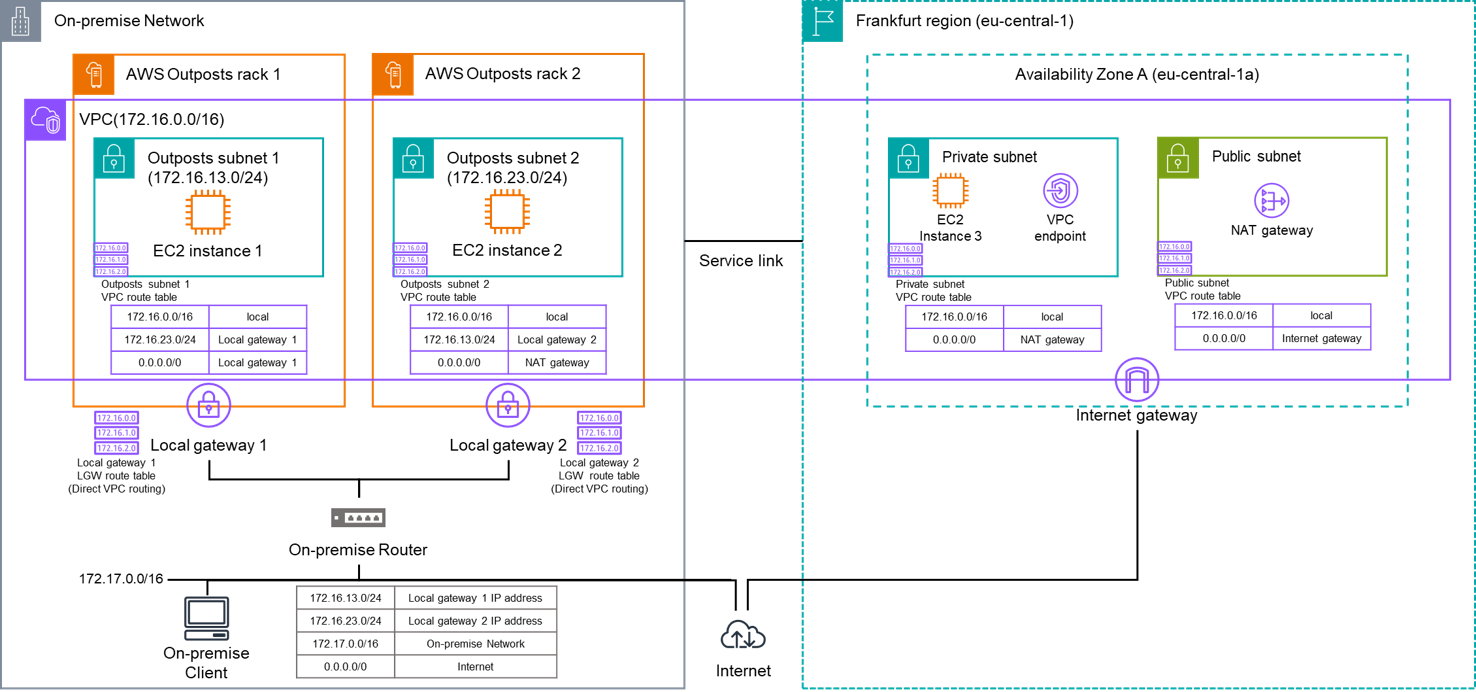
We describe the communication flows for EC2 instance 1 placed on AWS Outposts rack 1 to each component as follows.
- ■Communication with EC2 instance 2 on AWS Outposts rack 2
EC2 instance 1 → Local gateway 1 → On-premises Router → Local gateway 2 → EC2 instance 2 - ■Communication with EC2 instance 3 in the Frankfurt region
EC2 instance 1 → Service link → EC2 instance 3
Note: Routes whose destination is within the VPC CIDR and whose target is local are used. - ■Communication with a VPC endpoint in the Frankfurt region
EC2 instance 1 → Service link → VPC endpoint
Note: Routes whose destination is within the VPC CIDR and whose target is local are used. - ■Communication with an On-premises Client on the On-premises Network
EC2 instance 1 → Local gateway 1 → On-premises Router → On-premises Client - ■Communication with the Internet (via the On-premises Network)
EC2 instance 1 → Local gateway 1 → On-premises Router → Internet - ■Communication with the Internet (via the AWS Region)
EC2 instance 1 → Service link → NAT gateway → Internet
Note: Communication is possible when the VPC route table of Outposts subnet 1 in AWS Outposts rack 1, like the VPC route table of Outposts subnet 2 in AWS Outposts rack 2, has a destination of "0.0.0.0/0" targeting the NAT gateway in the AWS Region.
3. Consideration When using EXPRESSCLUSTER X on AWS Outposts racks
We use the first-generation AWS Outposts racks in this verifications.
When building HA clusters with EC2 instances on AWS Outposts racks, we need to consider the following points.
3.1 Control Plane and Data Plane
APIs for AWS services have two planes: the control plane and the data plane. The control plane provides management APIs to create, read/describe, update, delete, and list (CRUDL) AWS services. The data plane provides the service functionality that operates as determined by the control plane. For details on each plane, please refer to the following.
[Reference]
Control planes and data planes - AWS Fault Isolation Boundarieshttps://docs.aws.amazon.com/whitepapers/latest/aws-fault-isolation-boundaries/control-planes-and-data-planes.html
On AWS Outposts racks, the control plane uses the one on an AWS Region, so CRUDL operations for AWS services require connectivity to an AWS Region. On the other hand, the data plane runs within the AWS Outposts racks, so operation is possible even if connectivity to an AWS Region is lost.
One of the key advantages of AWS Outposts racks is that they can run locally. Therefore, by adopting a configuration that operates solely on the data plane that does not depend on an AWS Region, we can achieve a more highly available system.
[Reference]
Static stability - AWS Fault Isolation Boundarieshttps://docs.aws.amazon.com/whitepapers/latest/aws-fault-isolation-boundaries/static-stability.html
Thinking in terms of failure modes - AWS Outposts High Availability Design and Architecture Considerationshttps://docs.aws.amazon.com/whitepapers/latest/aws-outposts-high-availability-design/thinking-in-terms-of-failure-modes.html
3.2 Application Load Balancer
When deploying an Application Load Balancer (hereinafter called ALB) in an AWS Region, we must create it in subnets in two availability zones. However, when deploying on AWS Outposts racks, we must configure it in a single Outposts subnet.
Therefore, it is not possible to deploy an ALB that spans Outposts subnets in multiple AWS Outposts racks.
3.3 Amazon S3 on Outposts
As of our verifications in August 2025, Amazon S3 on Outposts (Amazon Simple Storage Service on an AWS Outposts rack) does not support static website hosting, so we cannot configure it as the HTTP NP resolution destination for EXPRESSCLUSTER described in the following article.
On the other hand, because an HA cluster that uses EC2 instances on AWS Outposts racks is connected to the local network, we can prevent both-system activation by configuring business-critical on-premises devices as the HTTP NP resolution destination or Ping NP resolution destination.
3.4 Communication Between Multiple AWS Outposts racks
With AWS Outposts racks, we create an Outposts subnet (a virtual network for AWS Outposts racks) in the VPC and deploy AWS resources. We can include Outposts subnets created for multiple AWS Outposts racks in a single VPC. However, as described in "2. Network components of AWS Outposts rack", when communicating between the Outposts subnets of multiple AWS Outposts racks, we need to configure routes in the VPC route table, the LGW route table, and the on-premises router.
In this verifications, we use the LGW with Direct VPC routing. In Direct VPC routing, only the subnet routes whose target in the VPC route table is set to LGW are dynamically propagated to the LGW route table, and we cannot configure static routes. Therefore, we cannot use virtual IP addresses that require CIDRs outside the VPC for communication across multiple AWS Outposts racks or between an AWS Outposts rack and the on-premises network.
[Reference]
Outposts Rack Intra-VPC routing - AWS Outposts High Availability Design and Architecture Considerationshttps://docs.aws.amazon.com/whitepapers/latest/aws-outposts-high-availability-design/intra-vpc-routing.html
4. Verifications
We verified the following three configurations on AWS Outposts racks.
4.1 Verification 1: Building an HA Cluster with Two EC2 Instances on a Single AWS Outposts rack
4.2 Verification 2: Building an HA Cluster with Two EC2 Instances on Two AWS Outposts racks
4.3 Verification 3: Building an HA Cluster with Two EC2 Instances Between an AWS Outposts rack and an AWS Region
The overall configuration diagram for this verification is as follows.
For both Windows and Linux, we created two EC2 instances for each verification and built the mirror disk type HA cluster.
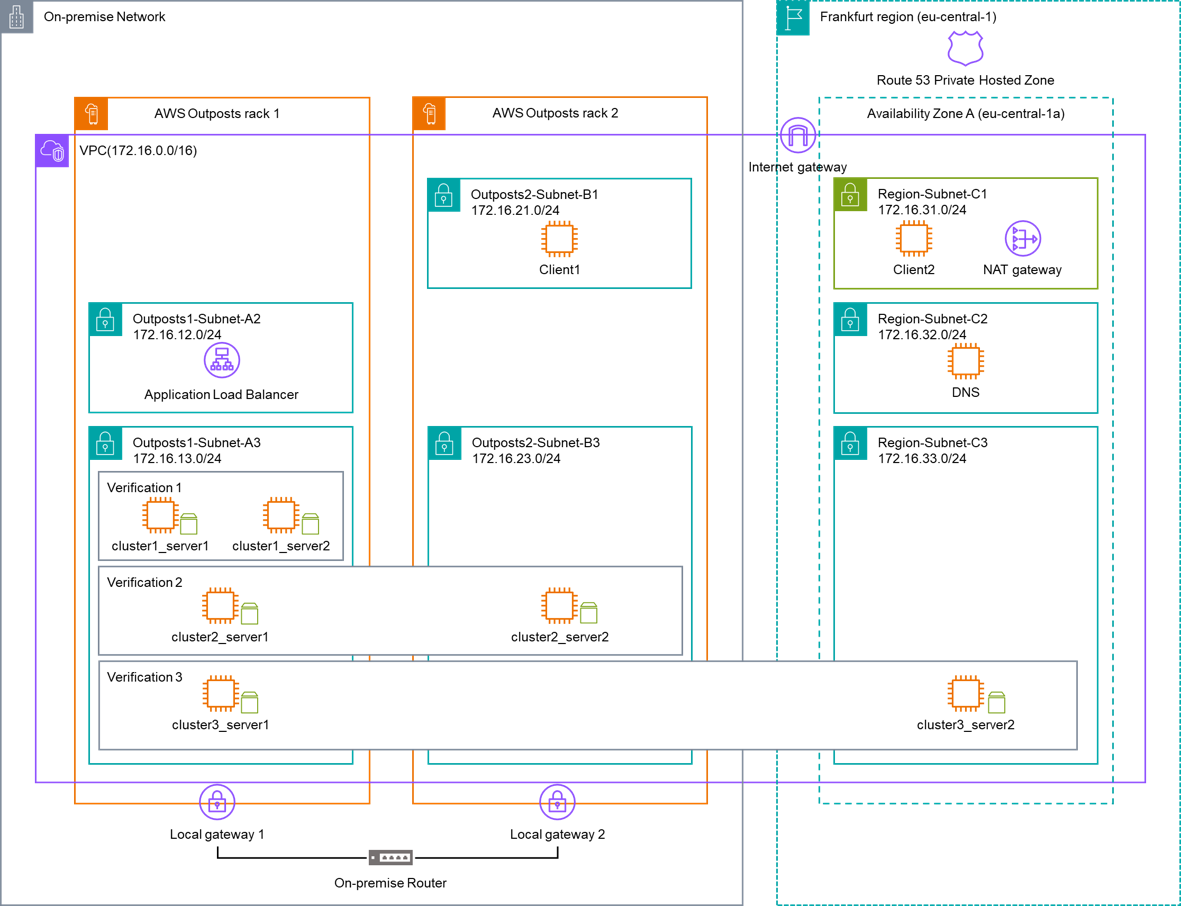
The overall network configuration is as follows.
■ Network configurations
- VPC (VPC ID: vpc-aaaa1234)
- - CIDR: 172.16.0.0/16
- - Subnets
- - AWS Outposts rack 1
- ■ Outposts1-Subnet-A2 (Subnet ID: subnet-aaaa2222): 172.16.12.0/24
- ■ Outposts1-Subnet-A3 (Subnet ID: subnet-aaaa3333): 172.16.13.0/24
- - AWS Outposts rack 2
- ■ Outposts2-Subnet-B1 (Subnet ID: subnet-bbbb1111): 172.16.21.0/24
- ■ Outposts2-Subnet-B3 (Subnet ID: subnet-bbbb3333): 172.16.23.0/24
- - eu-central-1a
- ■ Region-Subnet-C1 (Subnet ID: subnet-cccc1111): 172.16.31.0/24
- ■ Region-Subnet-C2 (Subnet ID: subnet-cccc2222): 172.16.32.0/24
- ■ Region-Subnet-C3 (Subnet ID: subnet-cccc3333): 172.16.33.0/24
The common configurations for the EC2 instance for the HA clusters in each verification are as follows.
■ EC2 instances
- Instance type: m5.xlarge
- EBS
- - Root disk: gp2, Size appropriate for the OS
- - Mirror disk: gp2, 1024 GiB
- - Cluster partition: 1024 MiB
- - Data partition: 1023 GiB
■ OS
- Windows: Windows Server 2022
- Linux: Red Hat Enterprise Linux 8.4
■ EXPRESSCLUSTER version
- EXPRESSCLUSTER X 5.3 for Windows (Internal version: 13.30)
- EXPRESSCLUSTER X 5.3 for Linux (Internal version: 5.3.0-1)
In each verification, we built mirror disk type HA clusters using the following five connection target switching methods. However, depending on the configuration, some switching methods cannot be used.
As part of checking the operation, we checked whether we could access the destination provided by each switching method, and whether the monitor resources for each switching method detected a failure.
| Switching method | Action | Communication with the control plane |
|---|---|---|
| Using the ALB | In the HA cluster, when application start/stop is controlled on the EC2 instances, the port used by the ALB health check is opened/closed to manage which targets the ALB routes traffic to.
|
Unnecessary |
| Dynamic DNS resource | The IP address associated with the virtual host name registered in the DNS server’s A record is updated to the actual IP address of the active server (EC2 instance) in the HA cluster. | Unnecessary |
| AWS DNS resource | The IP address associated with the virtual host name registered in the Amazon Route 53 A record is updated to the actual IP address of the active server (EC2 instance) in the HA cluster. | Necessary |
| AWS secondary IP resource | A secondary private IPv4 address is assigned to and unassigned from the ENI of the EC2 instances in the HA cluster.
|
Necessary |
| AWS virtual IP resource | An IP address outside the VPC CIDR block is used as a Virtual IP address (hereinafter called VIP). To ensure that traffic to the VIP is routed to the active EC2 instance in the HA cluster, the VIP is assigned and unassigned at the OS level, and the route entries in the VPC route table are updated. | Necessary |
4.1 Verification 1: Building an HA Cluster with Two EC2 Instances on a Single AWS Outposts rack
4.1.1 Verification Configuration
In this verification, we built and verified a mirror disk type HA cluster with two EC2 instances on a single AWS Outposts rack. For the connection target switching methods of the HA cluster, we evaluated five options: using the ALB, dynamic DNS resource, AWS DNS resource, AWS secondary IP resource, and AWS virtual IP resource.
To enhance availability, we configured the host level spread placement group so that the EC2 instances for the HA cluster are placed on different hosts within the same AWS Outposts rack.
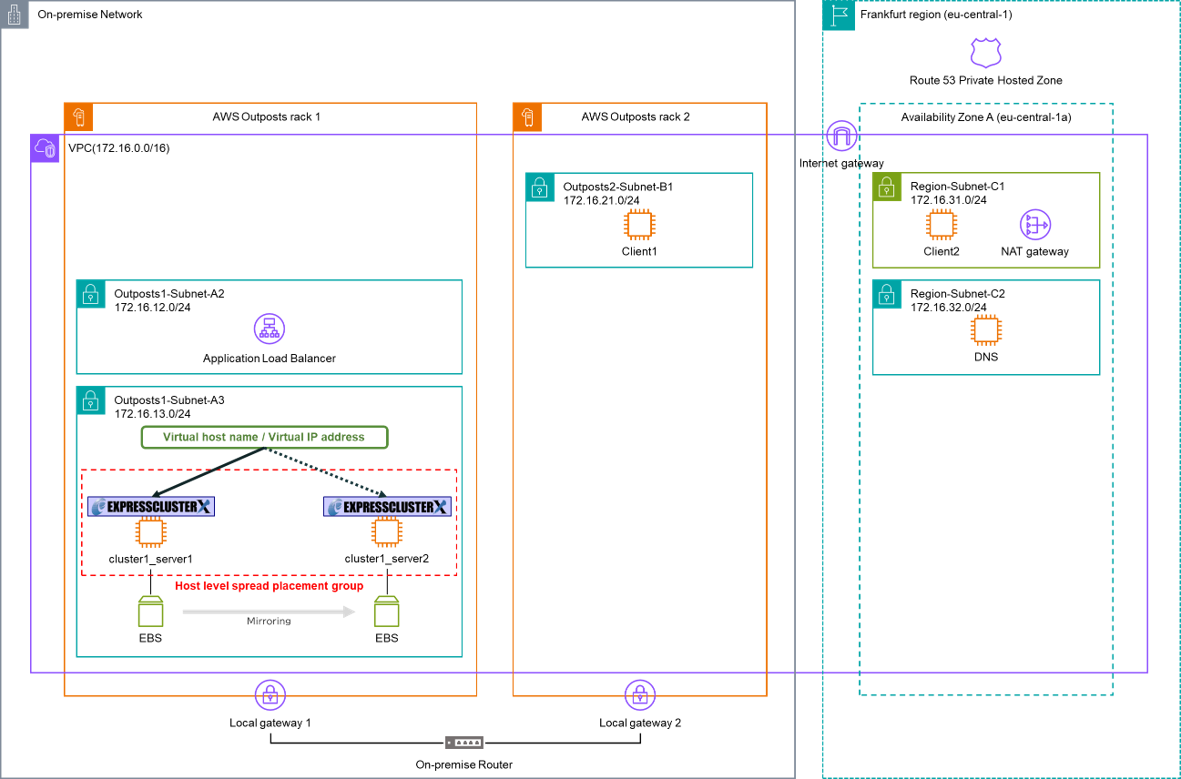
The HA cluster configuration in this verification is as follows.
■ EC2 instances for the HA cluster (Windows)
- AWS Outposts rack 1
- - cluster1_server1_win
- - IP address: 172.16.13.110/24
- - cluster1_server2_win
- - IP address: 172.16.13.120/24
■ EC2 instances for the HA cluster (Linux)
- AWS Outposts rack 1
- - cluster1_server1_lin
- - IP address: 172.16.13.111/24
- - cluster1_server2_lin
- - IP address: 172.16.13.121/24
■ EXPRESSCLUSTER settings
| Switching method | EXPRESSCLUSTER resources | Notes |
|---|---|---|
| Using the ALB |
|
We used a configuration that uses a web server (Windows: IIS, Linux: Apache) as an example application, therefore we set the ALB health check port to HTTP (80). |
| Dynamic DNS resource |
|
We built a DNS server in Region-Subnet-C2. |
| AWS DNS resource |
|
We managed the domain in an Amazon Route 53 private hosted zone. |
| AWS secondary IP resource |
|
|
| AWS virtual IP resource |
|
4.1.2 Verification Results
We present the verification items and results for building an HA cluster with two EC2 instances on a single AWS Outposts rack as follows.
| Verification items | Results | Notes |
|---|---|---|
| Switching the connection destination using the ALB | OK | The connection destination is managed using application control resources (Service resource, EXEC resource, etc.), rather than EXPRESSCLUSTER resources for switching the connection destination. Therefore, there are no monitor resources verification. |
| Switching the connection destination using the dynamic DNS resource | OK | |
| Switching the connection destination using the AWS DNS resource | OK | |
| Switching the connection destination using the AWS secondary IP resource | OK | |
| Switching the connection destination using the AWS virtual IP resource | OK (restricted placement for client) | Because the routes in the LGW route table cannot be edited (see "3.4 Communication Between Multiple AWS Outposts racks"), VIP cannot be used for communication originating outside AWS Outposts rack 1 that references the LGW route table. |
4.2 Verification 2: Building an HA Cluster with Two EC2 Instances on Two AWS Outposts racks
4.2.1 Verification Configuration
In this verification, we built and verified a mirror disk type HA cluster with two EC2 instances on two AWS Outposts racks. For the connection target switching methods of the HA cluster, we evaluated three options: dynamic DNS resource, AWS DNS resource, and AWS virtual IP resource.
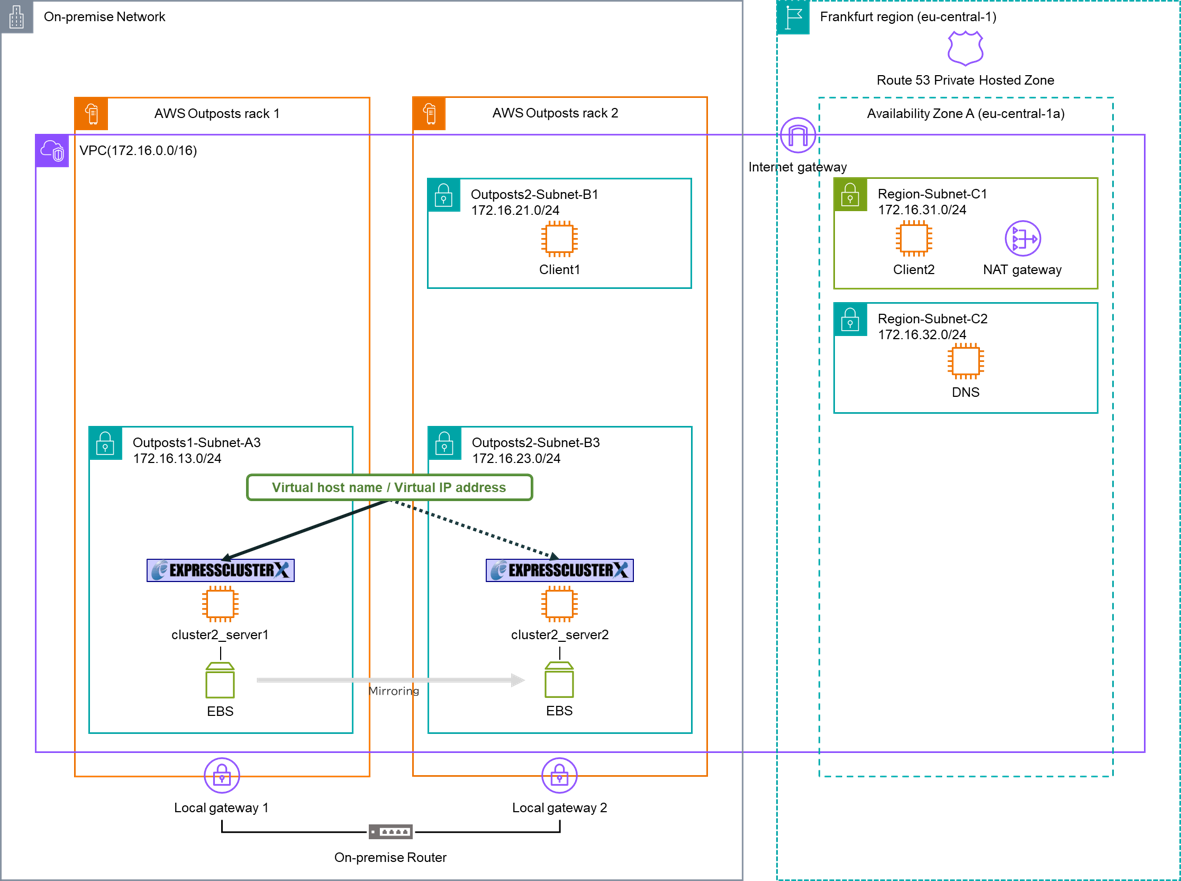
The HA cluster configuration in this verification is as follows.
■ EC2 instances for the HA cluster (Windows)
- AWS Outposts rack 1
- - cluster2_server1_win
- - IP address: 172.16.13.112/24
- AWS Outposts rack 2
- - cluster2_server2_win
- - IP address: 172.16.23.122/24
■ EC2 instances for the HA cluster (Linux)
- AWS Outposts rack 1
- - cluster2_server1_lin
- - IP address: 172.16.13.113/24
- AWS Outposts rack 2
- - cluster2_server2_lin
- - IP address: 172.16.23.123/24
■ EXPRESSCLUSTER settings
| Switching method | EXPRESSCLUSTER resources | Notes |
|---|---|---|
| Dynamic DNS resource |
|
We built a DNS server in Region-Subnet-C2. |
| AWS DNS resource |
|
We managed the domain in an Amazon Route 53 private hosted zone. |
| AWS virtual IP resource |
|
- * On the AWS Outposts racks, configurations that use the ALB and the AWS secondary IP resource are limited to a single Outposts subnet, so we excluded them from this verification.
4.2.2 Verification Results
We present the verification items and results for building an HA cluster with two EC2 instances on two AWS Outposts racks as follows.
| Verification items | Results | Notes |
|---|---|---|
| Switching the connection destination using the dynamic DNS resource | OK | |
| Switching the connection destination using the AWS DNS resource | OK | |
| Switching the connection destination using the AWS virtual IP resource | OK (restricted placement for client) | Because the routes in the LGW route table cannot be edited (see "3.4 Communication Between Multiple AWS Outposts racks"), VIP cannot be used for communication originating outside AWS Outposts rack 1 that references the LGW route table. |
4.3 Verification 3: Building an HA Cluster with Two EC2 Instances Between an AWS Outposts rack and an AWS Region
4.3.1 Verification Configuration
In this verification, we built and verified a mirror disk type HA cluster with two EC2 instances between an AWS Outposts rack and an AWS Region. For the connection target switching methods of the HA cluster, we evaluated three options: dynamic DNS resource, AWS DNS resource, and AWS virtual IP resource.
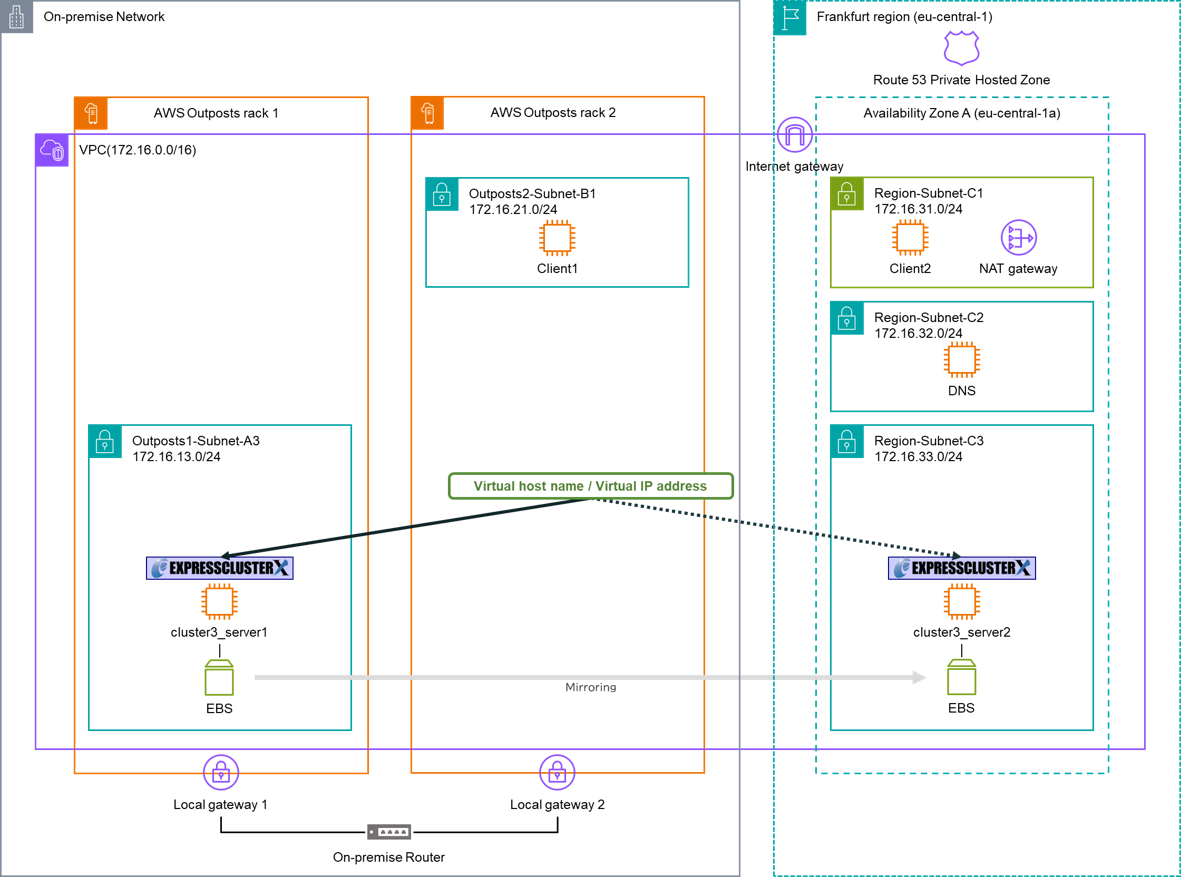
The HA cluster configuration in this verification is as follows.
■ EC2 instances for the HA cluster (Windows)
- AWS Outposts rack 1
- - cluster3_server1_win
- - IP address: 172.16.13.114/24
- AWS Region
- - cluster3_server2_win
- - IP address: 172.16.33.124/24
■ EC2 instances for the HA cluster (Linux)
- AWS Outposts rack 1
- - cluster3_server1_lin
- - IP address: 172.16.13.115/24
- AWS Region
- - cluster3_server2_lin
- - IP address: 172.16.33.125/24
■ EXPRESSCLUSTER settings
| Switching method | EXPRESSCLUSTER resources | Notes |
|---|---|---|
| Dynamic DNS resource |
|
We built a DNS server in Region-Subnet-C2. |
| AWS DNS resource |
|
We managed the domain in an Amazon Route 53 private hosted zone. |
| AWS virtual IP resource |
|
- * On the AWS Outposts racks, configurations that use the ALB and the AWS secondary IP resource are limited to a single Outposts subnet, so we excluded them from this verification.
4.3.2 Verification Results
We present the verification items and results for building an HA cluster with two EC2 instances between an AWS Outposts rack and an AWS Region as follows.
| Verification items | Results | Notes |
|---|---|---|
| Switching the connection destination using the dynamic DNS resource | OK | |
| Switching the connection destination using the AWS DNS resource | OK | |
| Switching the connection destination using the AWS virtual IP resource | OK (restricted placement for client) | Because the routes in the LGW route table cannot be edited (see "3.4 Communication Between Multiple AWS Outposts racks"), VIP cannot be used for communication originating outside AWS Outposts rack 1 that references the LGW route table. |
- *As described in "2. Network Components of AWS Outposts racks", AWS Outposts racks and an AWS Region are connected via the Service link, and data mirroring performance depends heavily on the latency of an AWS Direct Connect connection or an Internet connection.
Conclusion
We built an HA cluster on AWS Outposts racks and verified that it works.
On AWS Outposts racks, one key point for building a more failure-resilient system is to configure the HA cluster to use only the data plane on an AWS Outposts rack, without relying on the control plane in an AWS Region. With EXPRESSCLUSTER X, we can build HA clusters that use only the data plane with the following configuration patterns.
- ■HA cluster composed of two EC2 instances on a single AWS Outposts rack
-
Connection target switching using the ALB
-
Connection target switching using the dynamic DNS resource
-
- ■HA cluster composed of two EC2 instances on two AWS Outposts racks
-
Connection target switching using the dynamic DNS resource
-
If you consider introducing the configuration described in this article, you can perform a validation with the trial module of EXPRESSCLUSTER X. Please do not hesitate to contact us if you have any questions.