
Global Site
Displaying present location in the site.
January 14th, 2026
Machine translation is used partially for this article. See the Japanese version for the original article.
Introduction
With the cooperation of Amazon Web Services Japan G.K., we borrowed two AWS Outposts servers (one with an Intel Xeon processor and one with an AWS Graviton2 processor) and verified building an HA cluster between EC2 instances running on AWS Outposts servers.
We verified the following two configurations. In this article, we introduce considerations when building an HA cluster on AWS Outposts servers and share the results of each verification.
3.1 Verification 1: Building an HA Cluster with EC2 Instances on a Single AWS Outposts server
3.2 Verification 2: Building an HA Cluster with EC2 Instances on Two AWS Outposts servers
3.2 Verification 2: Building an HA Cluster with EC2 Instances on Two AWS Outposts servers
For this verification, we used AWS Outposts servers lab Tokyo at AWS Startup Loft (Meguro office, 17F) of Amazon Web Services Japan G.K., and NEC CONNECT 5G Lab as our co-creation environment.
The following pages are in Japanese. Please use the translation function as appropriate.
Contents
- 1. What is AWS Outposts?
- 2. Considerations When using EXPRESSCLUSTER X on AWS Outposts servers
- 2.1 Instance Types
- 2.2 Storage
- 2.3 Network Interfaces
- 2.4 EXPRESSCLUSTER Resources
- 3. Verifications
- 3.1 Verification 1: Building an HA Cluster with EC2 Instances on a Single AWS Outposts server
- 3.2 Verification 2: Building an HA Cluster with EC2 Instances on Two AWS Outposts servers
1. What is AWS Outposts?
AWS Outposts is a fully managed service that, when installed at customer locations such as data centers, factories, and retail stores, makes it possible to run AWS services outside AWS data centers. Its actual form consists of a physical server or rack that can be utilized in environments meeting the installation requirements.
This enables you to use familiar AWS services, tools, and APIs to integrate with on-premises systems with low latency and to meet data residency (location) requirements.
AWS Outposts comes in two types—AWS Outposts servers and AWS Outposts racks—which differ in pricing, physical size, processor options, and the number of available AWS services. As of January 14th, 2026, the available processors and services are:
■AWS Outposts servers
-
Processors
- -Intel Xeon processor
- -AWS Graviton2 processor
- -
-
AWS services
- -Amazon Elastic Compute Cloud (EC2)
- -Amazon Elastic Container Service (ECS)
- -AWS IoT Greengrass
- -Amazon Virtual Private Cloud
- -
■AWS Outposts racks
-
Processors
- -Intel Xeon processor
- -
-
AWS services
- -Amazon Elastic Compute Cloud (EC2)
- -Amazon Elastic Container Service (ECS)
- -Amazon Elastic Kubernetes Service (EKS)
- -Amazon Elastic Block Store (EBS)
- -Amazon EBS Snapshots
- -Amazon Simple Storage Service (S3)
- -Amazon Relational Database Service (RDS)
- -Amazon ElastiCache
- -Amazon EMR
- -Application Load Balancer (ALB)
- -Amazon Route 53 Resolver
- -AWS IoT Greengrass
- -AWS Elastic Disaster Recovery
- -Amazon Virtual Private Cloud
- -
AWS Graviton2 is an ARM-based processor known for its energy efficiency, contributing to cost reduction and lower CO2 emissions.
For details, please refer to the following.
2. Considerations When using EXPRESSCLUSTER X on AWS Outposts servers
For this verification, we used AWS Outposts servers.
When building an HA cluster with EC2 instances on AWS Outposts servers, consider the following points.
2.1 Instance Types
We can use EC2 instance types c6id (Intel Xeon processors) or c6gd (AWS Graviton2 processors). On Intel Xeon, we can select the x86_64 architecture, and on AWS Graviton2, we can select the ARM architecture.
We used EXPRESSCLUSTER X 5.1 for this verification, which does not support the ARM architecture.
However, for this verification, we used a special ARM evaluation build of EXPRESSCLUSTER X 5.1 to validate on AWS Outposts servers equipped with AWS Graviton2 processors.
- *EXPRESSCLUSTER X 5.2 and later support the ARM architecture.
2.2 Storage
On AWS Outposts servers, each EC2 instance can use only one instance store. Its size is fixed by the instance type, and for the c6id.2xlarge and c6gd.2xlarge used in our verification, it is fixed at 474 GiB and cannot be extended. Additionally, when we create an EC2 instance from an AMI, the root partition is automatically extended to consume all remaining free space.
Therefore, when building a mirror disk type cluster, we need to prepare an AMI in advance that has a mirror partition created on the instance store by following the steps below.
- 1.Launch an EC2 instance on the AWS cloud.
- 2.Extend the EBS volume, including the root volume, by the size required for the mirror partition.
- 3.Create a mirror partition in the free space of the root volume.
- 4.Create an AMI from the EC2 instance on the AWS cloud.
- *For c6id.2xlarge and c6gd.2xlarge, the maximum size of the mirror partition is "474 GiB minus the root partition size (GiB)".
Since we use the instance store as the root partition, shutting down the OS terminates the EC2 instance.
Therefore, if we wish to continue using the EC2 instance after a failure occurs, we need to change the EXPRESSCLUSTER recovery action from OS shutdown to OS restart or another appropriate action.
2.3 Network Interfaces
EC2 instances on AWS Outposts servers support two types of network interfaces. They differ in how IP addresses are assigned:
| Network interfaces | Usage | How to assign IP addresses |
|---|---|---|
| Elastic Network Interface (ENI) | Connect to AWS services via Service Link | Assign a specific IP address when launching an EC2 instance from the AWS Management Console. |
| Local Network Interface (LNI) | Connect to local/on-premises networks | Assign a specific IP address with nmcli command or by editing the ifcfg file, or configure a DHCP reservation so that the DHCP server assigns that IP address. |
When we create an EC2 instance and attach a secondary network interface, the LNI IP address is assigned automatically; however, that address is not usable for communication.
Therefore, we assign a usable IP address to the LNI with nmcli command or by editing the ifcfg file.
Depending on the OS, we may not be able to change the IP address with nmcli command or by editing the ifcfg file. In that case, we configure a DHCP reservation so that the DHCP server assigns the IP address to the LNI.
2.4 EXPRESSCLUSTER Resources
On the AWS cloud, EC2 ENIs do not support ARP. Therefore, we cannot use the floating IP resource in EXPRESSCLUSTER X and must use the AWS virtual IP resource instead.
On AWS Outposts servers, LNIs support ARP. Therefore, we can use the floating IP resource.
In this verification, we build an HA cluster where clients access services via the LNI. Therefore, we use the floating IP resource.
3. Verifications
We verified the following two configurations on AWS Outposts servers.
3.1 Verification 1: Building an HA Cluster with EC2 Instances on a Single AWS Outposts server
3.2 Verification 2: Building an HA Cluster with EC2 Instances on Two AWS Outposts servers
3.2 Verification 2: Building an HA Cluster with EC2 Instances on Two AWS Outposts servers
For EC2 instances on AWS Outposts servers, we used AMIs prepared according to the steps in 2.2 Storage. For details on launching EC2 instances on AWS Outposts servers, please refer to the following.
[Reference]
 Step 2: Launch an instance on the Outpost
Step 2: Launch an instance on the Outpost
Install EXPRESSCLUSTER X on the EC2 instances using the same installation procedure as on AWS cloud.
As noted in 2.2 Storage, on AWS Outposts servers, EC2 instances provide only the instance store. When we shut down the OS, the EC2 instance is terminated.
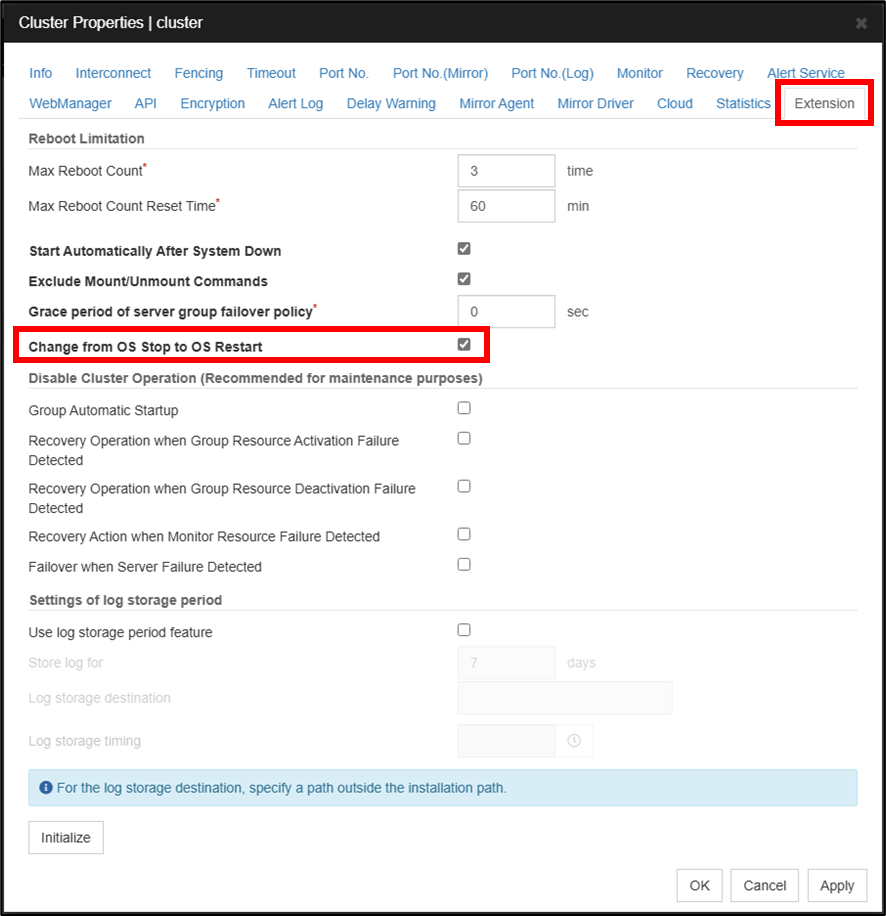
To prevent unexpected OS shutdown triggered by EXPRESSCLUSTER X behavior, we change the default action upon fault detection to OS restart.
[Cluster Properties] -> [Extension]tab -> Enable the checkbox for [Change from OS Stop to OS Restart]
For details on the changes in behavior due to the above settings, please refer to the following.
[Reference]
Documentation - Previous Versions
Documentation - Previous Versions-
EXPRESSCLUSTER X 5.1 > EXPRESSCLUSTER X 5.1 for Linux > Reference Guide-> 2. Parameter details-> 2.2. Cluster properties-> 2.2.21. Extension tab-> Change from OS Stop to OS Restart
3.1 Verification 1: Building an HA Cluster with EC2 Instances on a Single AWS Outposts server
3.1.1 Verification Configuration
In Verification 1, we verified the configuration of a mirror disk type HA cluster using two EC2 instances on a single AWS Outposts server.
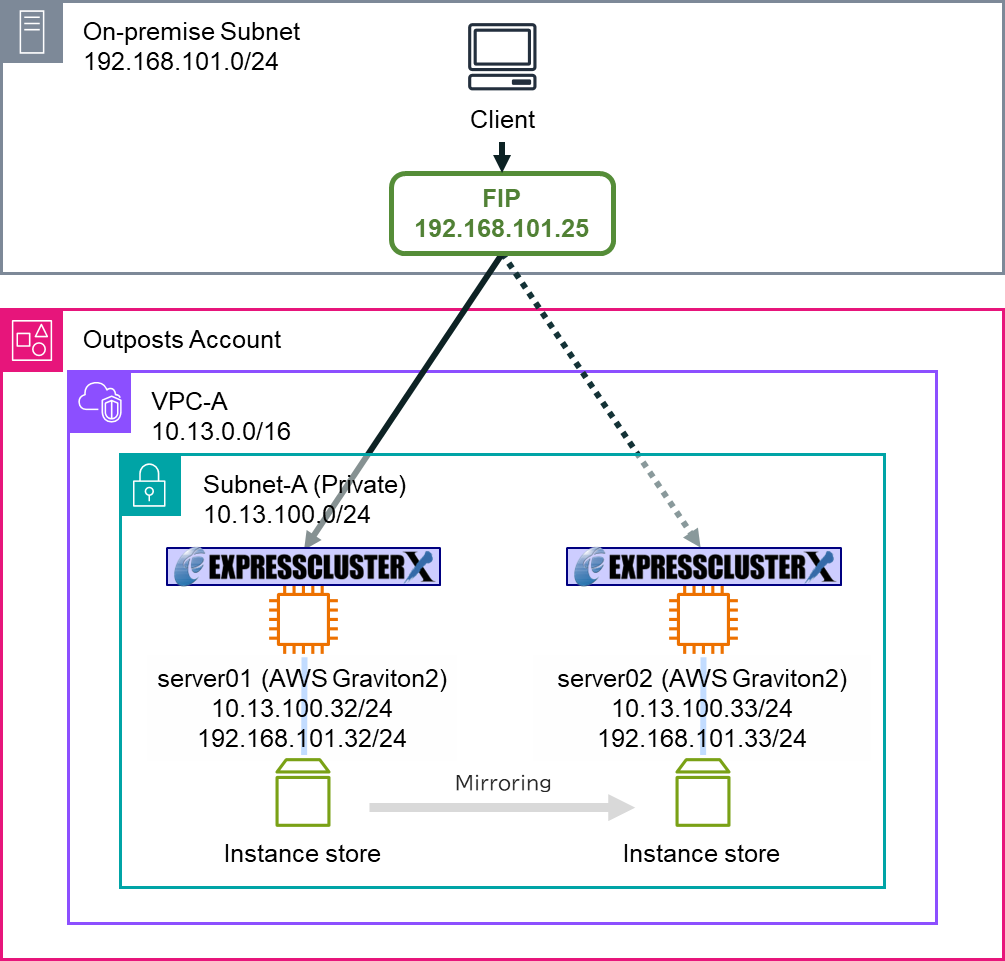
■HA cluster servers
-
server01
- -Hardware: AWS Outposts server (AWS Graviton2 processor)
- -Instance type: c6gd.2xlarge
- -Disk size: 474 GiB *fixed by instance type
- -OS: Red Hat Enterprise Linux 8.4
- -ENI IP address: 10.13.100.32/24
- -LNI Link IP address: 192.168.101.32/24
- -
-
server02
- -Hardware: AWS Outposts server (AWS Graviton2 processor)
- -Instance type: c6gd.2xlarge
- -Disk size: 474 GiB *fixed by instance type
- -OS: Red Hat Enterprise Linux 8.4
- -ENI IP address: 10.13.100.33/24
- -LNI Link IP address: 192.168.101.33/24
- -
■Network configuration
-
VPC-A (VPC ID: vpc-aaaa1234)
- -CIDR: 10.13.0.0/16
- ■Subnet-A (Subnet ID: subnet-aaaa1234): 10.13.100.0/24
- ■
- -
-
On-premises subnet
- -CIDR: 192.168.101.0/24
- -
■EXPRESSCLUSTER X settings
-
EXPRESSCLUSTER X
- -Failover group (failover)
- ■Floating IP resource
- -IP address: 192.168.101.25
- -
- ■Mirror disk resource
- ■
- -Monitors
- ■Floating IP monitor resource
- ■Mirror disk monitor resource
- ■Mirror disk connect monitor resource
- ■User mode monitor resource
- ■
- -
3.1.2 Verification Results
After starting the failover group, we checked:
-
The client could access the HA cluster with the floating IP address.
-
The floating IP resource assigned and released the floating IP address on each EC2 instance.
-
Data mirroring by the mirror disk resource was operating normally.
For failure testing, we simulated hardware issues (disabling the LNI interface, OS restart). We checked that EXPRESSCLUSTER detected the failures and automatically performed failover and recovery operations.
3.2 Verification 2: Building an HA Cluster with EC2 Instances on Two AWS Outposts servers
3.2.1 Verification Configuration
In Verification 2, we verified the configuration of a diskless type HA cluster using two EC2 instances on each of two different AWS Outposts servers (one AWS Graviton2 processor and one Intel Xeon processor).
- * When building an HA cluster on two EC2 instances with different CPU architectures, the mirror disk resource cannot be used. Therefore, this configuration validates only the floating IP resource.
- * In general, building an HA cluster with mixed CPU architectures is not recommended in EXPRESSCLUSTER X.
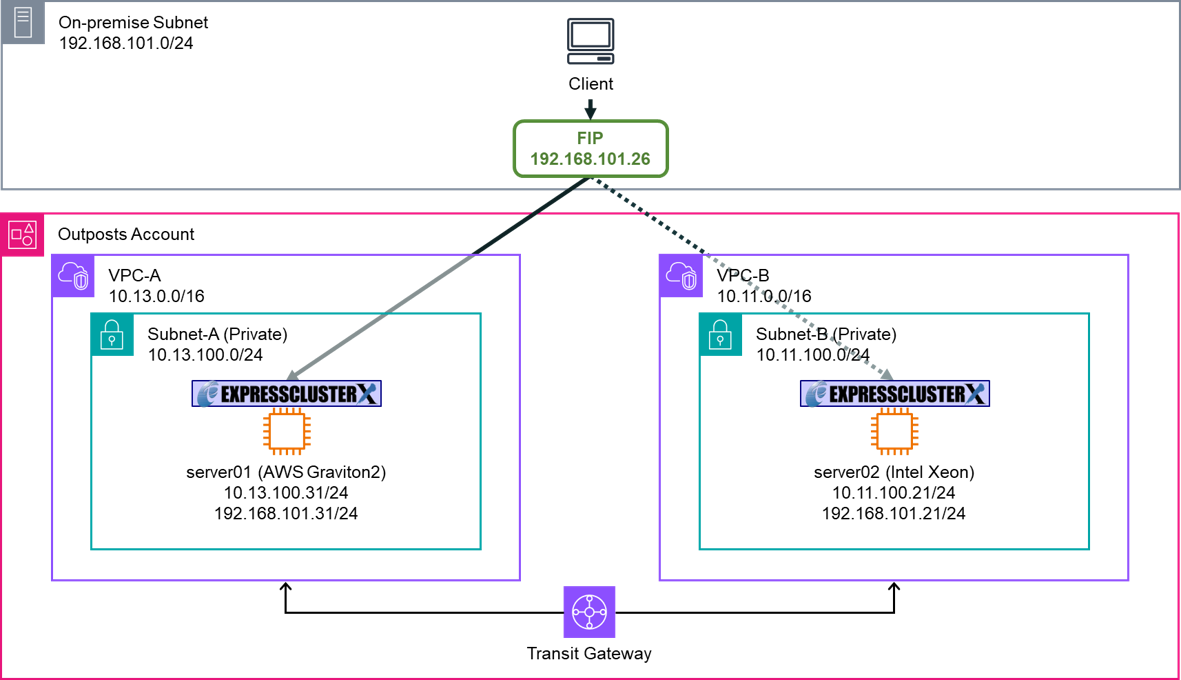
■HA cluster servers
-
server01
- -Hardware: AWS Outposts server (AWS Graviton2 processor)
- -Instance type: c6gd.2xlarge
- -Disk size: 474 GiB *fixed by instance type
- -OS: Red Hat Enterprise Linux 8.4
- -ENI IP address: 10.13.100.31/24
- -LNI Link IP address: 192.168.101.31/24
- -
-
server02
- -Hardware: AWS Outposts server (Intel Xeon processor)
- -Instance type: c6id.2xlarge
- -Disk size: 474 GiB *fixed by instance type
- -OS: Red Hat Enterprise Linux 8.4
- -ENI IP address: 10.11.100.21/24
- -LNI Link IP address: 192.168.101.21/24
- -
■Network configuration
-
VPC-A (VPC ID: vpc-aaaa1234)
- -CIDR: 10.13.0.0/16
- ■Subnet-A (Subnet ID: subnet-aaaa1234): 10.13.100.0/24
- ■
- -
-
VPC-B (VPC ID: vpc-bbbb5678)
- -CIDR: 10.11.0.0/16
- ■Subnet-B (Subnet ID: subnet-bbbb5678): 10.11.100.0/24
- ■
- -
-
On-premises subnet
- -CIDR: 192.168.101.0/24
- -
■EXPRESSCLUSTER X settings
-
EXPRESSCLUSTER X
- -Failover group (failover)
- ■Floating IP resource
- -IP address: 192.168.101.26
- -
- ■
- -Monitors
- ■Floating IP monitor resource
- ■User mode monitor resource
- ■
- -
3.2.2 Verification Results
After starting the failover group, we checked:
-
The client could access the HA cluster with the floating IP address.
-
The floating IP resource assigned and released the floating IP address on each EC2 instance.
For failure testing, we simulated hardware issues (disconnecting the LNI cable (*), OS restart). We checked that EXPRESSCLUSTER detected the failures and automatically performed failover and recovery operations.
- * Disconnecting the LNI cable on an AWS Outposts server can, in some cases, disrupt communication to AWS services in the cloud via Service Link.
Conclusion
We verified the process of building HA clusters on AWS Outposts servers.
Using EXPRESSCLUSTER X on AWS Outposts servers improves availability. By building mirror disk type HA clusters on AWS Outposts servers, we can mirror the data stored on each EC2 instance’s instance store. Even if one EC2 instance shuts down due to a failure, the healthy EC2 instance retains the data, thereby reducing the risk of data loss.
If you consider introducing the configuration described in this article, you can perform a validation with the trial module of EXPRESSCLUSTER. Please do not hesitate to contact us if you have any questions.