
Global Site
Displaying present location in the site.
October 9th, 2026
Machine translation is used partially for this article. See the Japanese version for the original article.
Introduction
In this article, we tried building an HA cluster based on DNS name control using the AWS DNS resource, with the AWS VPC endpoint (hereinafter called VPC endpoint) for Amazon Route 53 (hereinafter called Route 53) on Amazon Web Services (hereinafter called AWS).
Previously, to build an HA cluster based on DNS name control using Route 53, the EC2 instances that make up the HA cluster needed to have internet connectivity. This was because the AWS DNS resource uses the Route 53 service endpoint "route53.amazonaws.com", which required access via the internet.
Since November 2025, the Route 53 service endpoint has supported AWS PrivateLink (hereafter, PrivateLink). By creating a VPC endpoint for Route 53 within the VPC, EC2 instances can now access Route 53 without going through the internet.
As a result, even HA clusters that use the AWS DNS resource no longer require internet connectivity from EC2 instances, making it possible to build a more secure environment.
[Reference]
Amazon Route 53 DNS service now supports AWS PrivateLink - AWS https://aws.amazon.com/about-aws/whats-new/2025/11/amazon-route-53-dns-service-aws-privatelink/
Contents
1. What is a VPC Endpoint?
A VPC endpoint is a service that enables private connectivity between a VPC and AWS services outside the VPC through PrivateLink, without going through an Internet Gateway or a NAT Gateway.
For details on PrivateLink and VPC endpoints, see the following.
[Reference]
AWS PrivateLink concepts - Amazon Virtual Private Cloudhttps://docs.aws.amazon.com/vpc/latest/privatelink/concepts.html
For details on the AWS services that support PrivateLink, see the following.
[Reference]
AWS services that integrate with AWS PrivateLink - Amazon Virtual Private Cloudhttps://docs.aws.amazon.com/vpc/latest/privatelink/aws-services-privatelink-support.html
Note that the control plane for Route 53, which performs record changes and other operations, exists only in the US East (N. Virginia) Region. Therefore, you need to create a VPC endpoint for Route 53 in the N. Virginia Region. Therefore, when you create a VPC endpoint for Route 53, you must enable the cross-region endpoint option and select the N. Virginia Region. However, if the VPC endpoint is created in the N. Virginia Region, the cross-region endpoint option does not need to be enabled.
2. HA Cluster Configuration
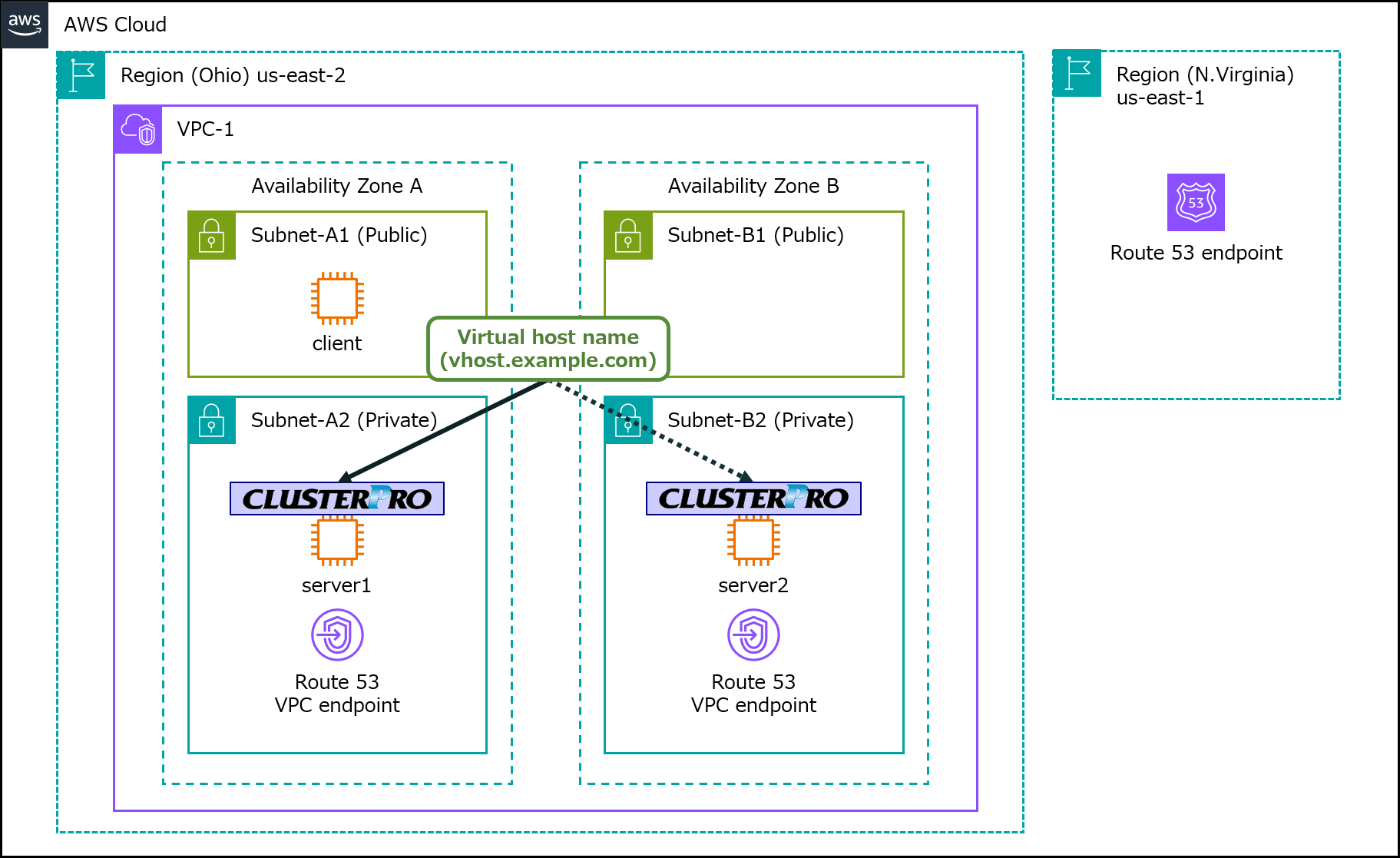
In this article, we build an HA cluster based on DNS name control in the Ohio Region.
We create the VPC endpoint for Route 53 in a multi-AZ configuration to ensure availability.
3. HA Cluster Build Procedure
3.1 Preparing to Build the HA Cluster
3.1.1 VPC Settings
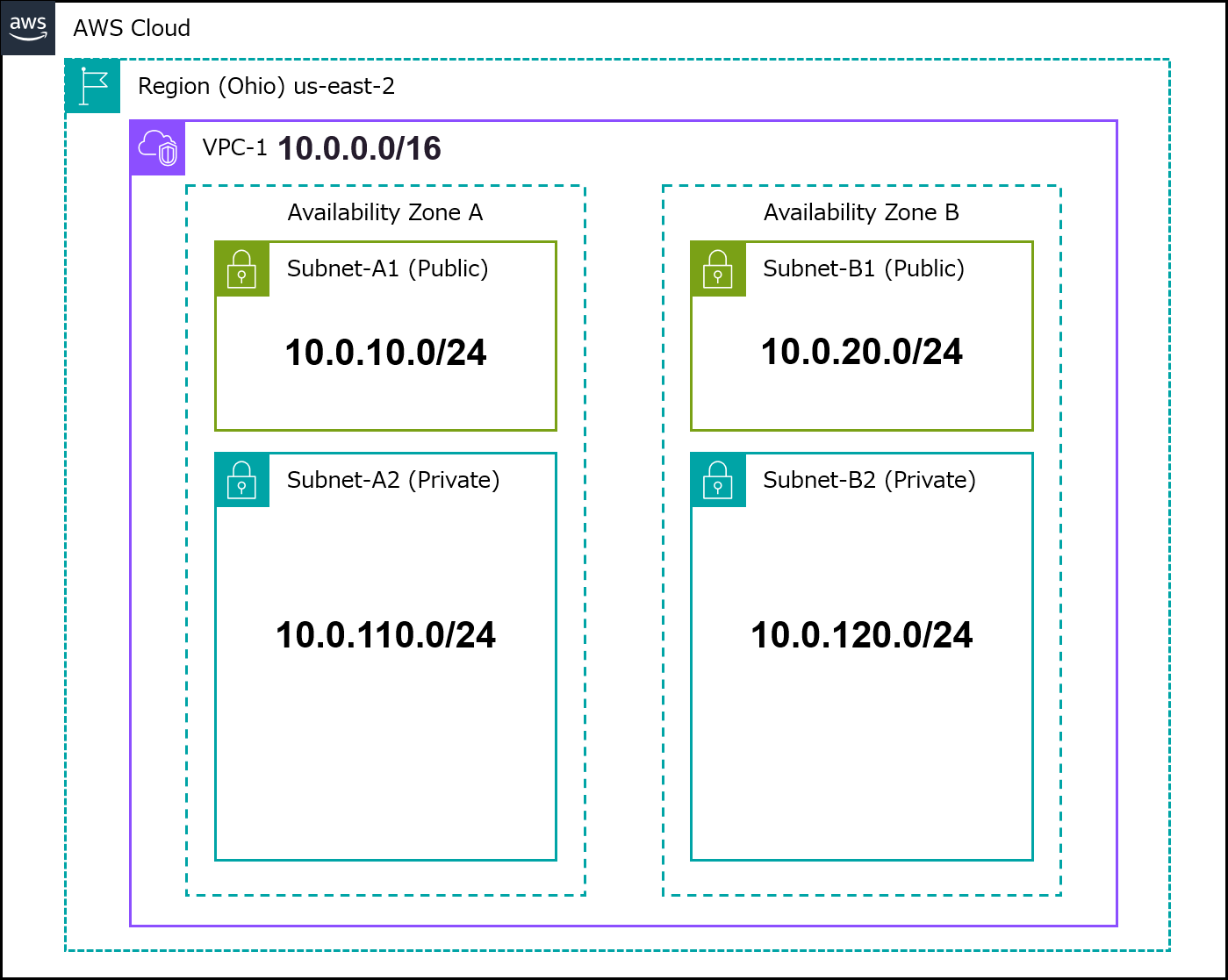
Create a VPC in advance. The VPC configuration is as follows. Note that both the "DNS resolution" and "DNS hostnames" settings of the VPC where you build the HA cluster is to be constructed must be enabled. If these settings are disabled, the Route 53 service endpoint "route53.amazonaws.com" will not be resolved to the private IP address of the VPC endpoint.
・VPC (VPC ID: vpc-1234abcd)
- CIDR: 10.0.0.0/16
- DNS resolution: Enabled
- DNS hostnames: Enabled
- Subnets
■Subnet-A1 (Subnet ID: sub-1111aaaa): 10.0.10.0/24
■Subnet-A2 (Subnet ID: sub-2222aaaa): 10.0.110.0/24
■Subnet-B1 (Subnet ID: sub-1111bbbb): 10.0.20.0/24
■Subnet-B2 (Subnet ID: sub-2222bbbb): 10.0.120.0/24
- Route Tables
■Main (Route Table ID: rtb-00000001)
・10.0.0.0/16 → local
■Route-A (Route Table ID: rtb-0000000a)
・10.0.0.0/16 → local
■Route-B (Route Table ID: rtb-0000000b)
・10.0.0.0/16 → local
3.1.2 Creating a Security Group for the VPC Endpoint
Create a security group to associate with the VPC endpoint.
When executing a Route 53 API, each EC2 instance that makes up the HA cluster communicates via HTTPS with the Route 53 service endpoint "route53.amazonaws.com".
Therefore, when creating a VPC endpoint, you need to allow HTTPS communication from the EC2 instances that make up the HA cluster in the inbound rules of the security group associated with the VPC endpoint.
The settings of the security group created in this case are as follows.
・Security Group Details
- Security group name: SG-HTTPS
- Inbound rules:
■Type: HTTPS
■Protocol: TCP
■Port range: 443
■Source: IP addresses of the EC2 instances that make up the HA cluster
3.1.3 Creating the VPC Endpoint
Create a VPC endpoint for Route 53.
・VPC Endpoint
- Type: AWS services
- Enable Cross Region endpoint: Enabled
- United States (N. Virginia) (us-east-1)
- com.amazonaws.route53
- VPC: vpc-1234abcd
- Enable private DNS name: Enabled
- Subnets
■us-east-2a
・Subnet: subnet-2222aaaa
・IPv4 address: 10.0.110.200
■us-east-2b
・Subnet: subnet-2222bbbb
・IPv4 address: 10.0.120.200
- Security group: SG-HTTPS
When "Enable private DNS name" is enabled, the private IP address of the VPC endpoint corresponding to the Route 53 service endpoint "route53.amazonaws.com" is registered as an A record in the Route 53 VPC Resolver, which is the default DNS of the VPC.
When disabled, the Route 53 service endpoint "route53.amazonaws.com" is resolved to a public IP address.
Note that if you are running your own DNS server, you need to manually configure the records so that the Route 53 service endpoint "route53.amazonaws.com" can be resolved to the private IP address of the VPC endpoint.
3.1.4 Creating a Route 53 Private Hosted Zone
Create a Route 53 private hosted zone to register the virtual host name used by the HA cluster.
・Route 53 Private Hosted Zone (Hosted Zone ID: Z12345abcde)
- Domain name: example.com
- Type: Private hosted zone
- VPCs to associate with the hosted zone: vpc-1234abcd
- *In this article, we used a Route 53 private hosted zone, but you can also build the same configuration using a Route 53 public hosted zone.
3.1.5 Creating an IAM Role and IAM Policy for EC2 Instances
Create an IAM role and an IAM policy for the EC2 instances that make up the HA cluster.
The permissions granted to the EC2 instances for using the AWS DNS resource and the AWS DNS monitor resource are the same whether or not a VPC endpoint is used.
For details on the required permissions, refer to the Getting Started Guide.
[Reference]
Documentation - Manuals
Documentation - Manuals-
EXPRESSCLUSTER X 6.0 > EXPRESSCLUSTER X 6.0 for Windows > Getting Started Guide
→ 6 Notes and Restrictions
→ 6.2 Before installing EXPRESSCLUSTER
→ 6.2.17 IAM settings in the AWS environment -
EXPRESSCLUSTER X 6.0 > EXPRESSCLUSTER X 6.0 for Linux > Getting Started Guide
→ 6 Notes and Restrictions
→ 6.3 Before installing EXPRESSCLUSTER
→ 6.3.20 IAM settings in the AWS environment
3.1.6 Creating EC2 Instances
Create the EC2 instances that make up the HA cluster.
■Windows
・server1
- VPC: vpc-1234abcd
- Subnet: subnet-2222aaaa
- IP address: 10.0.110.100
- IAM role: <the one created in the previous section>
・server2
- VPC: vpc-1234abcd
- Subnet: subnet-2222bbbb
- IP address: 10.0.120.100
- IAM role: <the one created in the previous section>
■Linux
・server1
- VPC: vpc-1234abcd
- Subnet: subnet-2222aaaa
- IP address: 10.0.110.101
- IAM role: <the one created in the previous section>
・server2
- VPC: vpc-1234abcd
- Subnet: subnet-2222bbbb
- IP address: 10.0.120.101
- IAM role: <the one created in the previous section>
3.2 Building an HA Cluster based on DNS Name Control
In this verification, we used EXPRESSCLUSTER X 6.0 (Windows: Internal Ver. 14.01, Linux: Internal Ver. 6.0.1-1).
Create an "HA cluster based on DNS name control". The EXPRESSCLUSTER configuration is as follows. We register two resources in the failover group: an "AWS DNS resource" and a "Mirror disk resource".
■Windows
・EXPRESSCLUSTER
- Failover group (failover)
■AWS DNS resource
・Common
- Hosted Zone ID: Z12345abcde
- Resource record set name: vhost-win.example.com.
- IP address: 10.0.110.100
- TTL: 300 seconds
・server1
- Set individually: Enabled
- IP address: 10.0.110.100
・server2
- Set individually: Enabled
- IP address: 10.0.120.100
■Mirror disk resource
・Data partition: M:
・Cluster partition: R:
■Linux
・EXPRESSCLUSTER
- Failover group (failover)
■AWS DNS resource
・Common
- Hosted Zone ID: Z12345abcde
- Resource record set name: vhost-lin.example.com.
- IP address: 10.0.110.101
- TTL: 300 seconds
・server1
- Set individually: Enabled
- IP address: 10.0.110.101
・server2
- Set individually: Enabled
- IP address: 10.0.120.101
■Mirror disk resource
・Data partition: /dev/lvg/lvm-data
・Cluster partition: /dev/lvg/lvm-cluster
For details on the procedures for building an HA cluster using the AWS DNS resource, refer to the HA Cluster Configuration Guide for Amazon Web Services.
[Reference]
Documentation - Manuals
Documentation - Manuals-
Windows > Cloud > Amazon Web Services > HA Cluster Configuration Guide for Amazon Web Services
→ 7 Constructing an HA cluster based on DNS name control -
Linux > Cloud > Amazon Web Services > HA Cluster Configuration Guide for Amazon Web Services
→ 7 Constructing an HA cluster based on DNS name control
The TTL configured for the AWS DNS resource affects the time it takes for name resolution of the virtual host name to be performed correctly after records are rewritten due to failover or other events.
4. Verifying Operation
On each EC2 instance that makes up the HA cluster, verify that the Route 53 service endpoint hostname can be resolved and that the failover group can be started.
Also, use nslookup or a similar tool to verify that the connection destination changes via the virtual host name before and after failover.
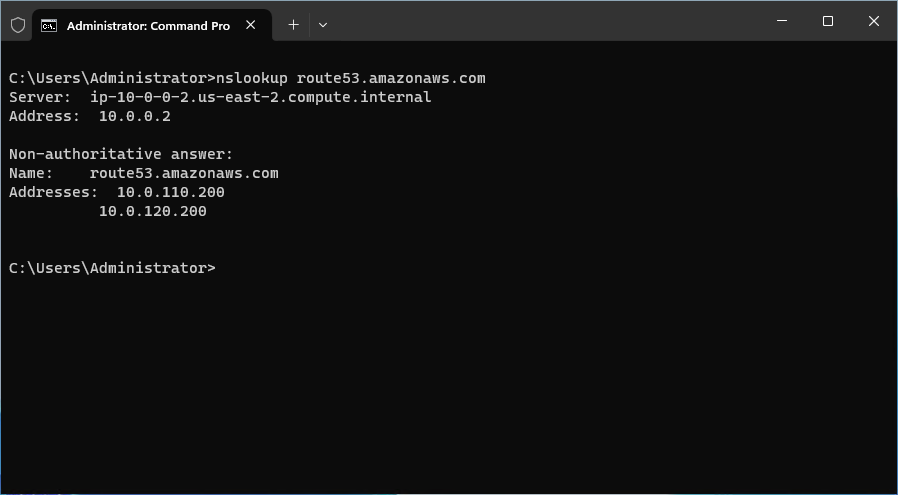
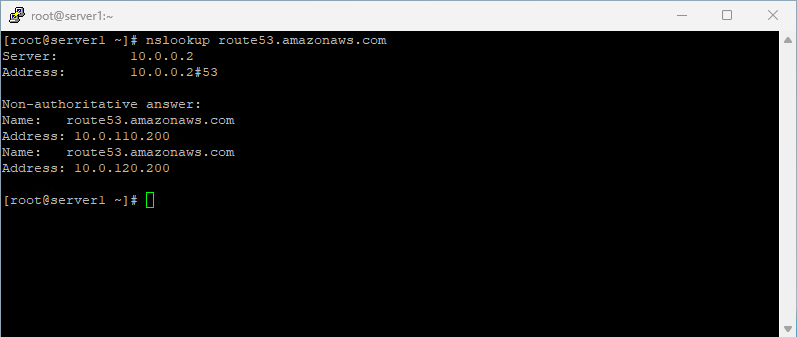
- 1.From each EC2 instance that makes up the HA cluster, use nslookup or a similar tool to verify that "route53.amazonaws.com" is resolved to the private IP address of the VPC endpoint for Route 53.
■Windows
■Linux
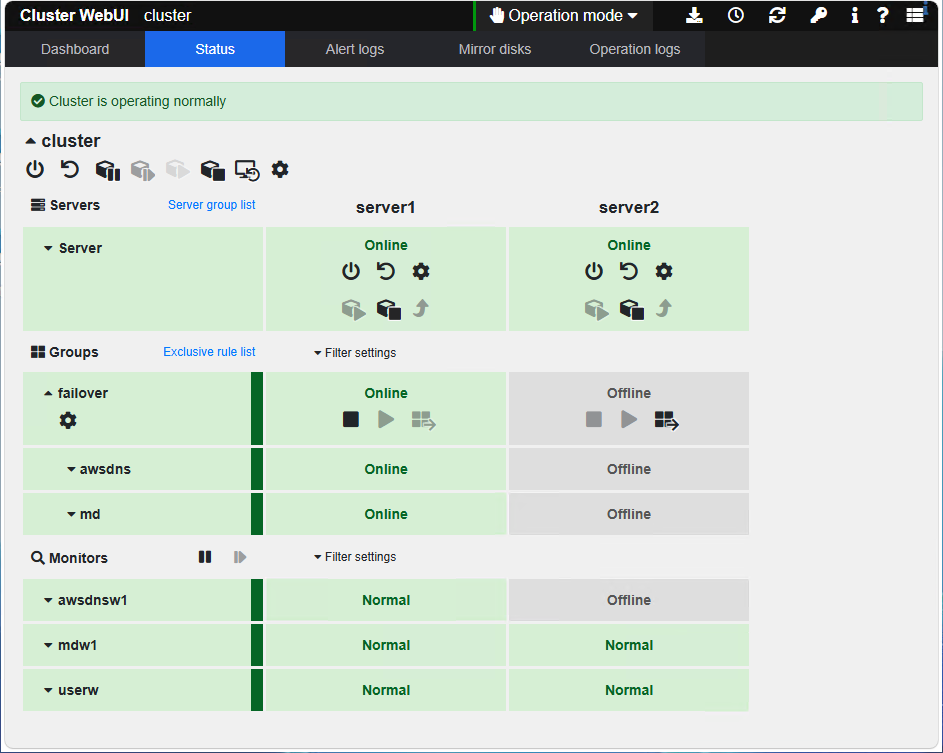
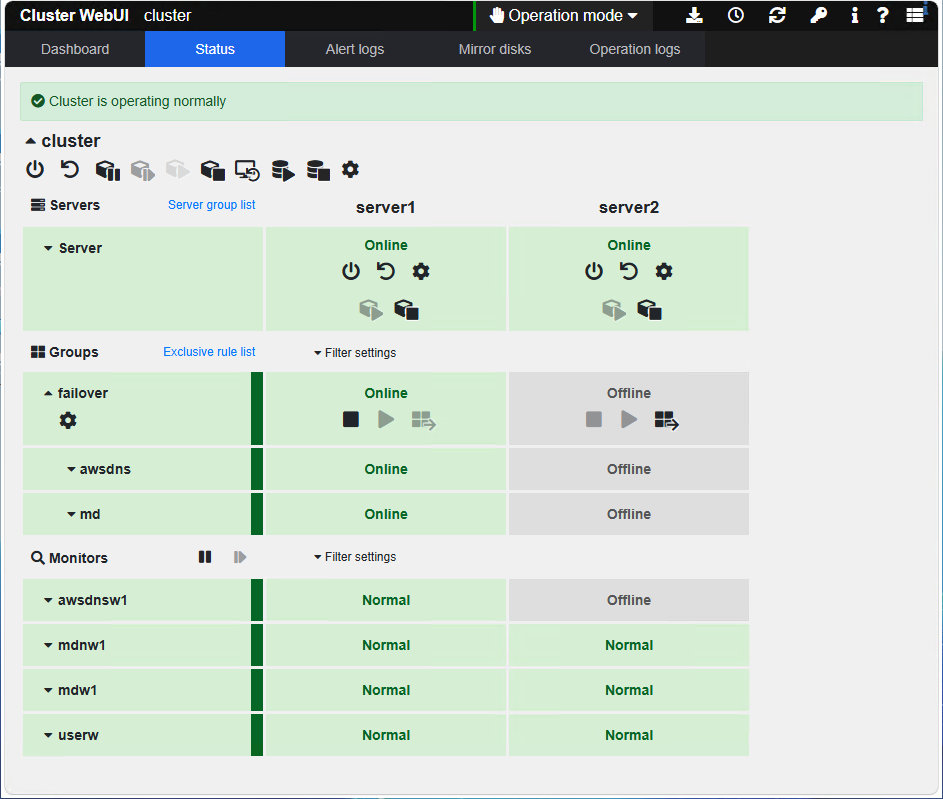
- 2.Start the failover group on server1 and verify that it starts normally.
■Windows
■Linux
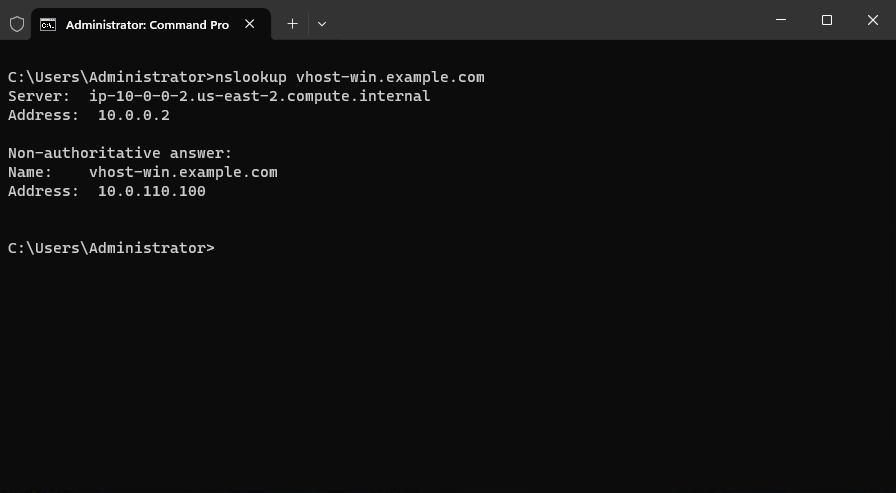
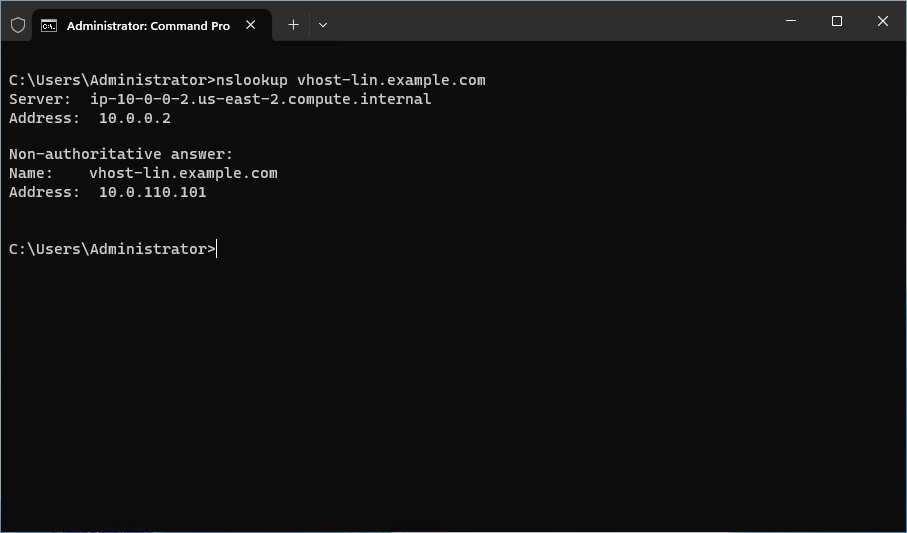
- 3.Use nslookup or a similar tool to verify that the virtual host name is resolved to server1.
■Windows
■Linux
- 4.Manually move the failover group from server1 to server2 and verify that it starts normally.
- 5.Use nslookup or a similar tool to verify that the virtual host name is resolved to server2.
Conclusion
In this article, we tried building an HA cluster based on DNS name control using the AWS DNS resource with a VPC endpoint for Route 53.
By using the VPC endpoint for Route 53, the Route 53 record changes made by the AWS DNS resource can be performed without going through the internet. If you want to build a more secure environment, please use this procedure as a reference when building your HA cluster.
If you consider introducing the configuration described in this article, you can perform a validation with the trial module of EXPRESSCLUSTER X. Please do not hesitate to contact us if you have any questions.